
SPELL CHECKER ACTIVATION INSTRUCTIONS
WINDOWS XP

MICROSOFT WORD 2010
1. Open a Microsoft Word Options/Proofing.
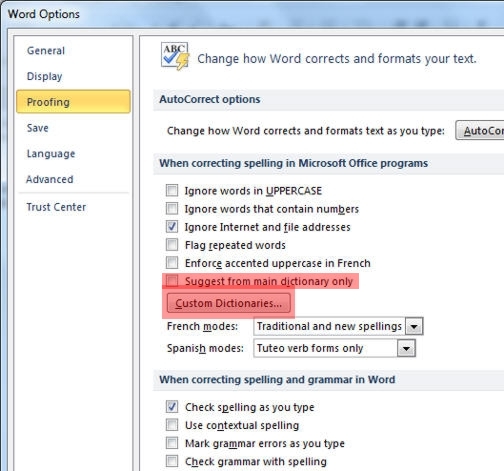
2. Remove any checkmark from "Suggest from main dictionary only." Then click on the "Custom Dictionaries" button.
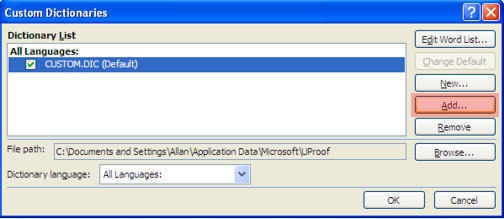
3. Click on the "Add" button. You are going to add a new custom dictionary.
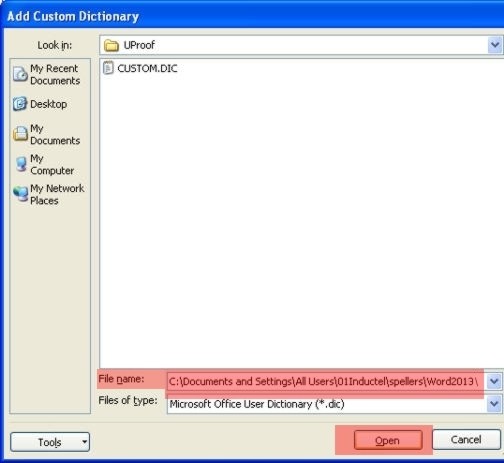
4. Paste the following path into the "File name" box. Then hit the "Open" button.
C:\Documents and Settings\All Users\01Inductel\spellers\Word2013\
From the "Word2013" folder, select the Inductel custom dictionary, and click on "Open."
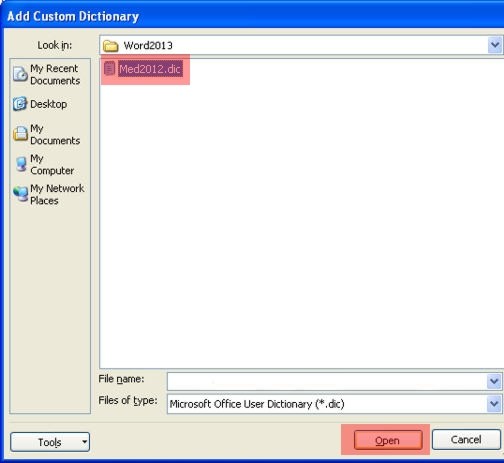
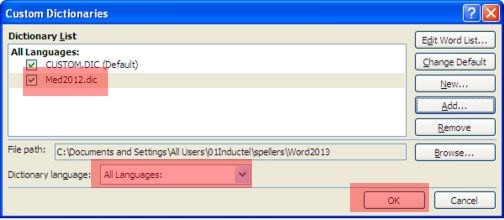
The Inductel dictionary will either be named "Med2012.dic" or "Combo2012.dic" depending on which Inductel product you have.
5. Make sure the Inductel custom dictionary is check marked. Make sure the Dictionary language is "All Languages." Now click on the OK button, and return to your document.
6. Verify that your new speller is working in Microsoft Word. Key in some test words.
Medical speller key in: abrachia, Celebrex, and sternocleidomastoid. If your new speller is working it will pass those words as being correctly spelled.
Legal speller key in: ab initio, judicata, legitimum, respondere. If your new speller is working it will pass those words as being correctly spelled.
Sci & Tech speller key in: abrachia, Celebrex, and sternocleidomastoid. If your new speller is working it will pass those words as being correctly spelled.
Combination speller key in: abrachia, Celebrex, and sternocleidomastoid. If your new speller is working it will pass those words as being correctly spelled.
7. Done!
---------------------------------------------------------------
For information on other Inductel products, upgrades, etc., please visit the Inductel website at www.inductel.com . For technical support, please call Inductel at (408)655-5925, 9am to 5pm Pacific Time. Or send us an email at assistance.inductel@gmail.com 24/7. Or visit our "Help" page.