
|
|
|
SPELL CHECKER ACTIVATION INSTRUCTIONS APPLE NUMBERS |
First, make sure you have installed the latest version of either the Inductel Medical Spell Checker 24, or the Inductel Combination Spell Checker 24, on your Mac.
In brief, you will copy the Inductel Medical Spell Checker custom dictionary from a special folder on you Mac, to your word processing app. Then you'll enable the Inductel custom dictionary. To do that, execute the following instructions.
1. Destination folder: Open your Finder's Go menu, then hold down your keyboard's "option" key to make the "Library" link visible. (Your "option" key will usually be located in the lower left area of your keyboard between the control key and the Command key.)
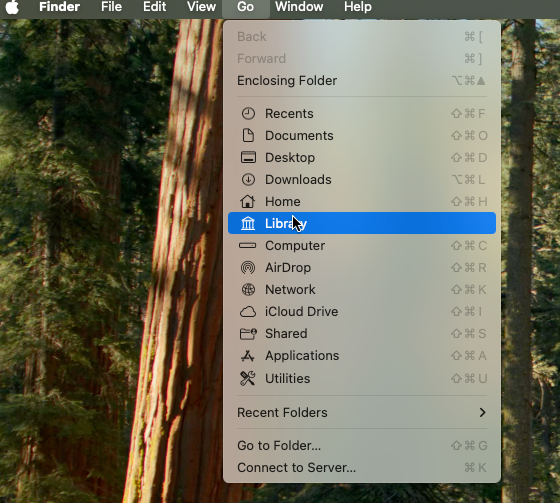
2. Now click on that Library link to open your Library folder. From there, navigate to your destination "Spelling" folder on the following path: Library / Spelling / .
3. Now, open that Spelling folder, and leave that window open. You will paste your new custom dictionary there.
4. Next, copy the source file. Open a new, separate window, and in it navigate to your new custom dictionary file named "LocalDictionary" . Your navigation path is: Users / Shared / 01Inductel / spellers / sfmacExpanded / MacMail / LocalDictionary . There, copy that "LocalDictionary" file to your clipboard. You'll be pasting it into the destination "Spelling" folder shortly.
5. Now back to the Destination Folder. Prepare to paste your copy of LocalDictionary into the Spelling folder. Please be advised that you may have to copy over any existing LocalDictionary there, so you may want to save any existing copy of LocalDictionary now.
6. OK, paste your new LocalDictionary into the Spelling folder.
7. Now, restart your Mac, and then run a spell check on these test words:
apopharma apotex arzerra ascor aurolife auryxia avycaz azilsartan azurity balversa belrapzo bendamustine bendeka berdazimer bionpharma biopharms carbaglu carboprost carglumic cenobamate cerovene corepharma crossmedika delcath dexcel dexlansoprazole dextroamp dimeglumine dimesylate dotarem
8. DONE!
For information on other Inductel products, upgrades, etc., please visit the Inductel website at www.inductel.com . For technical support, please call Inductel at (408)655-5925, 9am to 5pm Pacific Time. Or send us an email at assistance.inductel@gmail.com 24/7. Or visit our "Help" page.